Tasks
Productivity · Collaboration · Organization
Task Management
The task management system provides a comprehensive solution for organizing work through Kanban boards. Users can create, assign, and track tasks with drag-and-drop functionality, priority levels, and due dates. The system supports both personal task management and team collaboration through task assignment with real-time notifications for task assignment and completion.
Kanban workflow
Visual task management with drag-and-drop across three columns.
Task assignment
Assign tasks to team members with real-time notifications.
Priority & due dates
Urgent and normal priority levels with deadline tracking.
Key Features
Essential task management tools.
Kanban Board
Visual board with Pending, In Progress, and Done columns.
Task Assignment
Assign tasks to team members within your company.
Drag & Drop
Move tasks between columns with instant status updates.
Priority Levels
Mark tasks as urgent or normal priority.
Due Dates
Set deadlines for task completion tracking.
Notifications
Real-time alerts for task assignment and completion.
List View
Track tasks you've assigned to others with filtering.
Export & Bulk Operations
Export to Excel and bulk delete assigned tasks.
Task Management Overview
Visual guide to task management features.
This video demonstrates the complete task management workflow including creating tasks, assigning them to team members, setting priorities and due dates, and managing tasks through the Kanban board interface.
Assigned to Me - Tasks List Interface
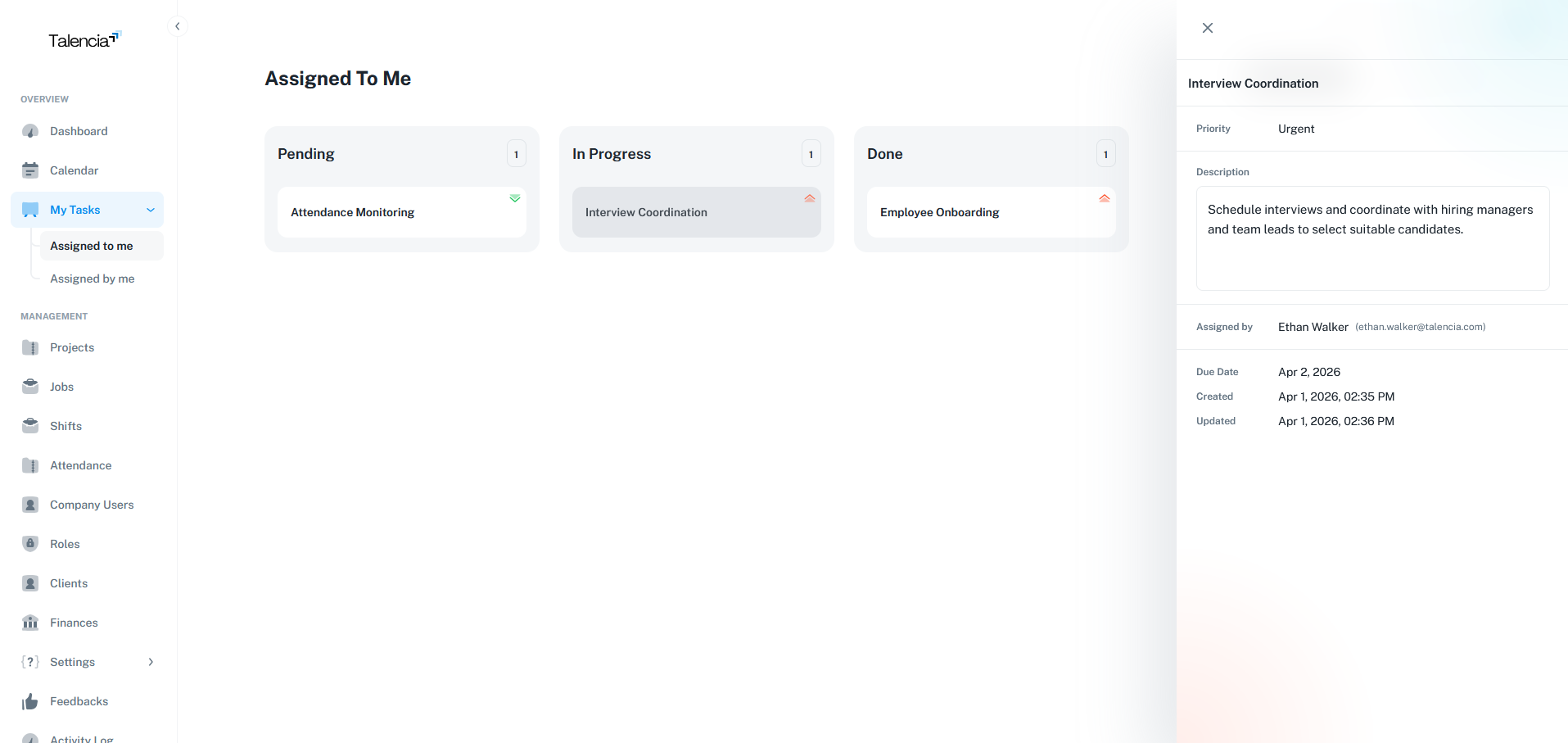
The "Assigned to Me" tasks list shows all tasks that have been assigned to the current user. This interface provides filtering options, status indicators, priority levels, and bulk operations for efficient personal task management.
Assigned by Me - Tasks Management Interface
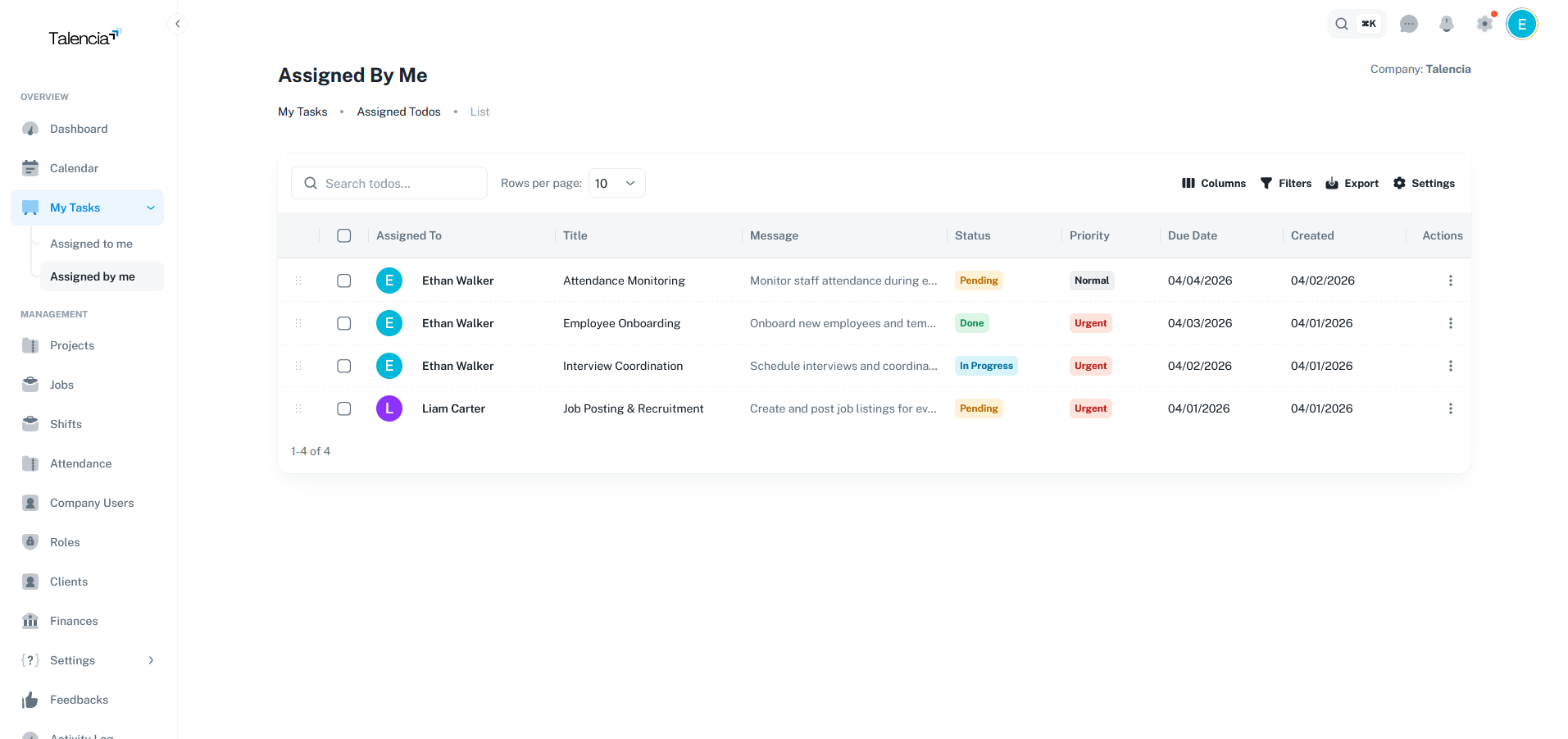
The "Assigned by Me" tasks list displays all tasks that the current user has assigned to other team members. This interface allows managers to track task progress, monitor completion status, reassign tasks, and manage workload distribution across the team.
Task Views
Different perspectives for task management.
Kanban Board (Assigned To Me)
- View tasks assigned to you in Kanban format
- Three columns: Pending, In Progress, Done
- Drag and drop to change task status
- Create personal tasks or assign to others
- Real-time status updates
Assigned Tasks List
- View tasks you've assigned to others
- Track assignee progress and completion
- Advanced filtering and sorting
- Export to Excel functionality
- Bulk delete operations
Task Status Flow
Complete lifecycle of tasks.
Pending
Task created but not yet started. Waiting to be picked up and worked on.
In Progress
Task is actively being worked on. The assignee has started the work.
Done
Task completed successfully. Notifies the task creator automatically.
Priority Levels
Task urgency classification.
Urgent
- High priority tasks requiring immediate attention
- Visual indicator for quick identification
- Should be completed as soon as possible
- Typically time-sensitive or critical
Normal
- Standard priority tasks
- Regular workflow items
- Default priority level
- Completed in normal course of work
Notifications
Real-time task alerts.
Task Assigned
Receive notification when someone assigns you a task.
Task Completed
Get notified when a task you assigned is marked as done.
Data Grid Features
Advanced table capabilities for assigned tasks.
Real-time Search
Search by title or message content.
Status Filtering
Filter by pending, in progress, or done status.
Priority Filtering
Filter by urgent or normal priority level.
Assignee Filtering
Filter by assigned team member name.
Date Filtering
Filter by creation date or due date.
Server-side Pagination
Handle large datasets with configurable page sizes.
Column Sorting
Sort by any column including title, status, date.
Bulk Operations
Select multiple tasks for bulk deletion.
Permissions
Required permissions for task operations.
| Action | Permission |
|---|---|
| View Tasks (Kanban) | todos.view |
| Create Task | todos.create |
| Edit Task | todos.update |
| Delete Task | todos.delete |
| Assign Task to Others | todos.create |
| Export Assigned Tasks | todos.view |
| Bulk Delete Tasks | todos.delete |
Best Practices
Task management guidelines.
| Practice | Recommendation |
|---|---|
| Task Titles | Use clear, descriptive titles for easy identification |
| Descriptions | Add detailed descriptions for complex tasks |
| Due Dates | Set realistic deadlines for time-sensitive work |
| Priority | Mark urgent tasks to prioritize work appropriately |
| Status Updates | Move tasks through columns as work progresses |
| Delegation | Use list view to monitor delegated tasks |
Troubleshooting
Common issues and solutions.
| Issue | Fix |
|---|---|
| Can't create a new task | Contact your administrator to ensure you have the right permissions to create tasks |
| Tasks list not showing | Try refreshing the page or check your internet connection. If the issue persists, contact support |
| Can't drag and drop tasks | You can only move tasks that are assigned to you. Contact the task owner if you need changes |
| Not getting task notifications | Check your notification settings to ensure task alerts are enabled |
| Can't delete a task | You can only delete tasks you created. For other tasks, contact the task owner or administrator |
| Download to Excel not working | Make sure your browser allows downloads and try again. If it still fails, try using a different browser |
| Can't delete multiple tasks | You can only delete tasks you created. For other tasks, contact the task owner or administrator |