Jobs
Positions · Roles · Staffing
Job Management
Jobs represent individual positions within projects that need to be filled by qualified staff. Each job has specific requirements, responsibilities, and compensation details.
Job creation
Define positions with requirements.
Staff assignment
Assign qualified staff to jobs.
Progress tracking
Monitor job completion and performance.
Key Features
Essential job tools.
Job Creation
Create positions with profession, requirements, and compensation details.
Candidate Management
Track applications and manage accepted candidates with counts.
Status Management
Click-to-change status workflow: active, inactive, completed, closed.
Advanced Filtering
Filter by roles, locations, requirements, projects, and experience.
Export & Bulk Operations
Export to Excel, bulk delete, and bulk contract sending.
Public Links
Generate view-only or view & select public links for jobs.
Jobs Management Overview
Visual guide to job management features.
This video demonstrates the complete job management workflow including job creation, status management, candidate tracking, and advanced features like filtering and bulk operations.
Status Workflow
Job lifecycle management.
Draft
Job is being prepared but not yet published. No applications accepted.
Active
Job is published and accepting applications. Candidates can apply.
Completed
Job has been successfully filled and completed.
Closed
Job is closed and no longer accepting applications.
Data Grid Features
Advanced table capabilities.
Real-time Search
Search by job title, project, or company with instant results.
Status Tabs
Quick filter by job status with live count badges.
Click-to-Change Status
Click job status labels to quickly change between states.
Row Actions Menu
View, Edit, Generate Links, Send Contracts, Delete actions.
Server-side Pagination
Handle large datasets with configurable page sizes (10, 25, 50, 100, All).
Column Sorting
Server-side sorting by title, project, status, candidates, applications.
Bulk Operations
Select multiple jobs for bulk delete and bulk contract sending.
Column Management
Show/hide columns, adjust density, customize table layout.
Export Functionality
Export filtered jobs to Excel with current applied filters.
Public Link Generation
Generate view-only or view & select public links for jobs.
Permissions
Required permissions for job operations.
| Action | Permission |
|---|---|
| View Jobs List | jobs.view |
| Create Job | jobs.create |
| Edit Job | jobs.update |
| Delete Job | jobs.delete |
| Export Jobs | jobs.view |
| Generate Public Links | jobs.update |
| Send Contracts | jobs.update |
| Bulk Delete | jobs.delete |
Merge Variables (Examples)
Available merge variables for job operations.
| Variable | Description |
|---|---|
{{ job.title }} | Job title (profession name) |
{{ job.status }} | Current job status |
{{ job.project_title }} | Associated project title |
{{ job.candidates_number }} | Number of positions available |
{{ job.applications_count }} | Total number of applications |
Data Grid Visual Examples
Visual demonstrations of job management interfaces.
Data Table Jobs
Main jobs list with advanced filtering, status tabs, and bulk operations
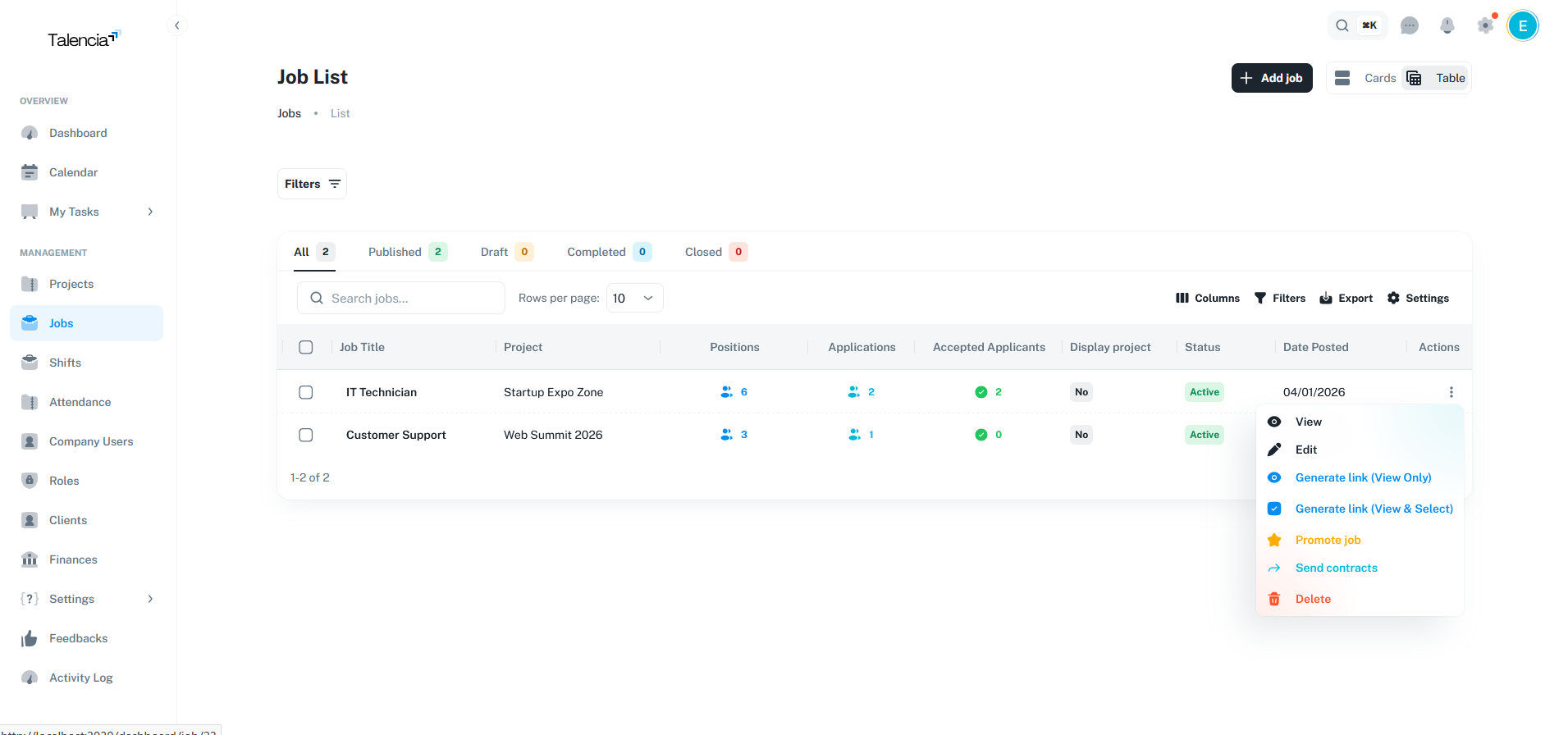
Edit Job
Edit job details, update requirements, and modify job settings
Best Practices
Job management guidelines.
| Practice | Recommendation |
|---|---|
| Job Creation | Define clear requirements, responsibilities, and compensation details |
| Status Management | Regularly update job status to reflect current state and progress |
| Candidate Tracking | Monitor applications and respond to candidates in a timely manner |
| Data Management | Use export feature for regular backups and reporting |
| Public Links | Generate public links only after accepting candidates to ensure availability |
Troubleshooting
Common issues and solutions.
| Issue | Fix |
|---|---|
| Can't create a new job | Contact your administrator to ensure you have the right permissions to create jobs |
| Jobs list not showing | Try refreshing the page or check your internet connection. If the issue persists, contact support |
| Can't generate public link | Make sure the job has accepted candidates and an active template is available |
| Download to Excel not working | Make sure your browser allows downloads and try again. If it still fails, try using a different browser |
| Can't delete multiple jobs | This feature may not be available for your role. Please check with your system administrator |