Attendances
Time Tracking · Monitoring · Accountability
Attendance Management
Comprehensive attendance tracking system for monitoring work completion, calculating compensation, and maintaining workforce accountability. Features real-time check-in/check-out, automated hour calculations, penalty management, and detailed reporting with shift-based tracking.
Real-time tracking
Live attendance status with QR code scanning.
Automated calculations
Work hours, overtime, and salary computation.
Penalty management
Late arrival and absence penalty system.
Key Features
Essential attendance management tools.
QR Code Check-in
Fast and secure QR code scanning for attendance.
Time Tracking
Precise check-in/check-out time recording.
Hour Calculation
Automatic work hours and salary computation.
Penalty System
Automated late arrival and absence penalties.
Advanced Reporting
Comprehensive attendance analytics and exports.
Status Management
Track present, late, absent, and checkout statuses.
Location Tracking
GPS-based attendance location verification.
Data Export
Export attendance data to Excel and PDF formats.
Attendance Management Overview
Visual guide to attendance management features.
This video demonstrates the complete attendance management workflow including QR code check-in, real-time monitoring, penalty assignment, and comprehensive reporting features.
Attendance Methods
Multiple check-in options for flexibility.
QR Code Scanning
- Primary check-in/check-out method
- Location-based verification
- Tamper-resistant and secure
- Real-time attendance recording
Manual Check-in
- Backup method for technical issues
- Supervisor verification required
- Exception handling support
- Detailed note recording
Auto Checkout
- Automated end-of-shift checkout
- Prevents forgotten checkouts
- Configurable timing rules
- Shift-based automation
Attendance Status Types
Different attendance states and their meanings.
Present
User checked in on time within the allowed late margin. Normal attendance status with full compensation.
Late
User checked in after the shift start time plus late margin. May trigger penalty depending on company policy.
Absent
User failed to check in for the shift. Requires manual intervention and may affect project coverage.
Checked Out
User has completed the shift and checked out. Hours are calculated and compensation is processed.
Data Grid Features
Advanced table capabilities for attendance management.
Real-time Search
Search by user name, email, profession, project, or shift.
Date Filtering
Filter attendance by specific dates or date ranges.
Status Filtering
Filter by present, late, absent, or checked out status.
User & Project Filter
Filter by specific users, projects, or shifts.
Server-side Pagination
Handle large datasets with configurable page sizes.
Column Sorting
Sort by any column including date, hours, status, and user.
Bulk Operations
Select multiple attendance records for bulk deletion.
Export Capabilities
Export filtered data to Excel and PDF formats.
Permissions
Required permissions for attendance operations.
| Action | Permission |
|---|---|
| View Attendances List | attendances.view |
| Create Attendance Record | attendances.create |
| Edit Attendance Record | attendances.update |
| Delete Attendance Record | attendances.delete |
| Assign Penalties | attendances.update |
| Assign Feedbacks | attendances.update |
| View Attendance Details | attendances.view |
| Export Attendance Data | attendances.view |
| Bulk Delete Attendances | attendances.delete |
| Auto Checkout | attendances.update |
Merge Variables (Examples)
Available merge variables for attendance operations.
| Variable | Description |
|---|---|
{{ attendance.user_name }} | Full name of the attendee |
{{ attendance.check_in_time }} | Check-in timestamp |
{{ attendance.check_out_time }} | Check-out timestamp |
{{ attendance.total_hours }} | Total worked hours |
{{ attendance.status }} | Current attendance status |
{{ attendance.project_title }} | Associated project name |
{{ attendance.shift_name }} | Associated shift name |
{{ attendance.profession }} | User's profession/role |
Visual Examples
Screenshots of attendance management interfaces.
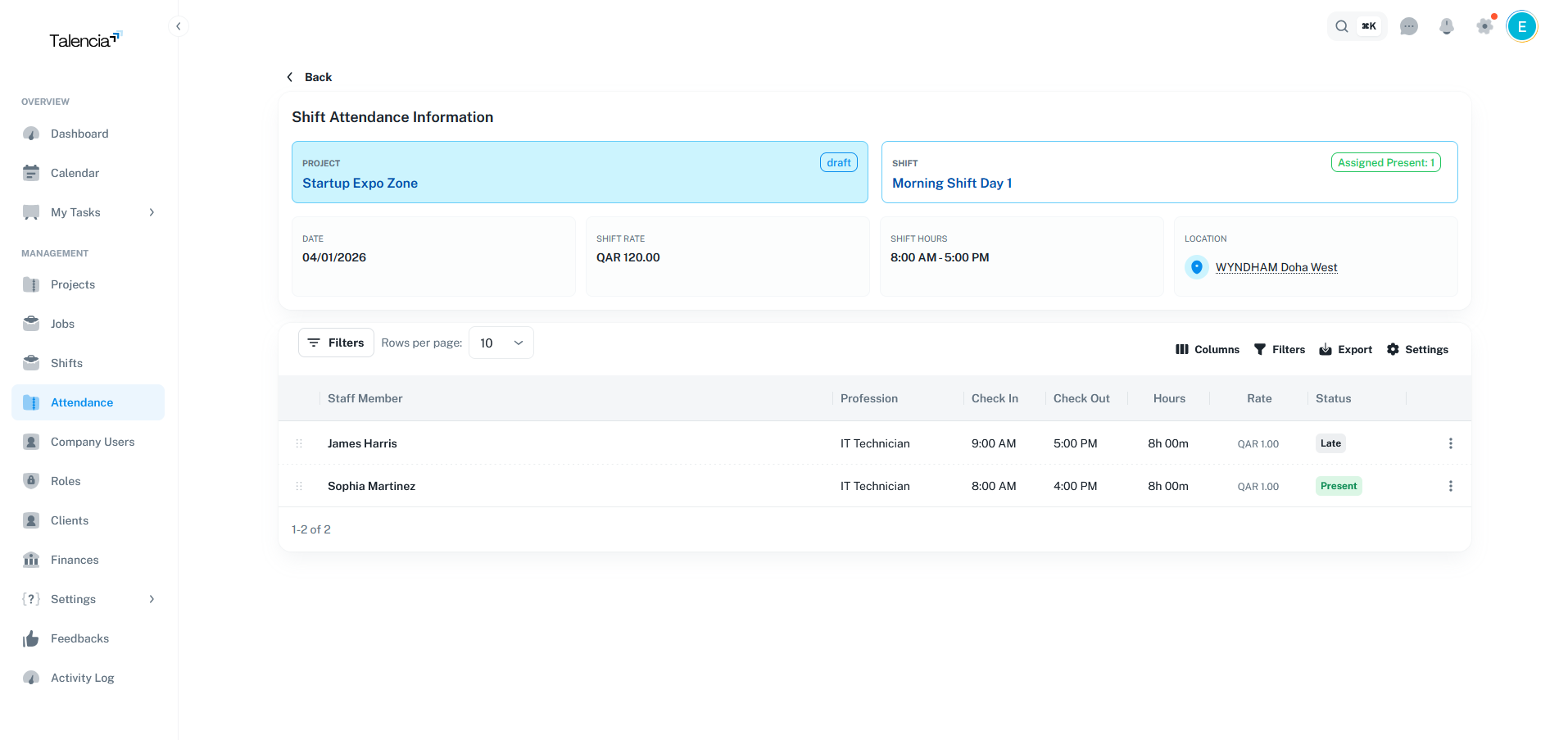
Attendance Details Screen
Detailed view of individual attendance records with all relevant information
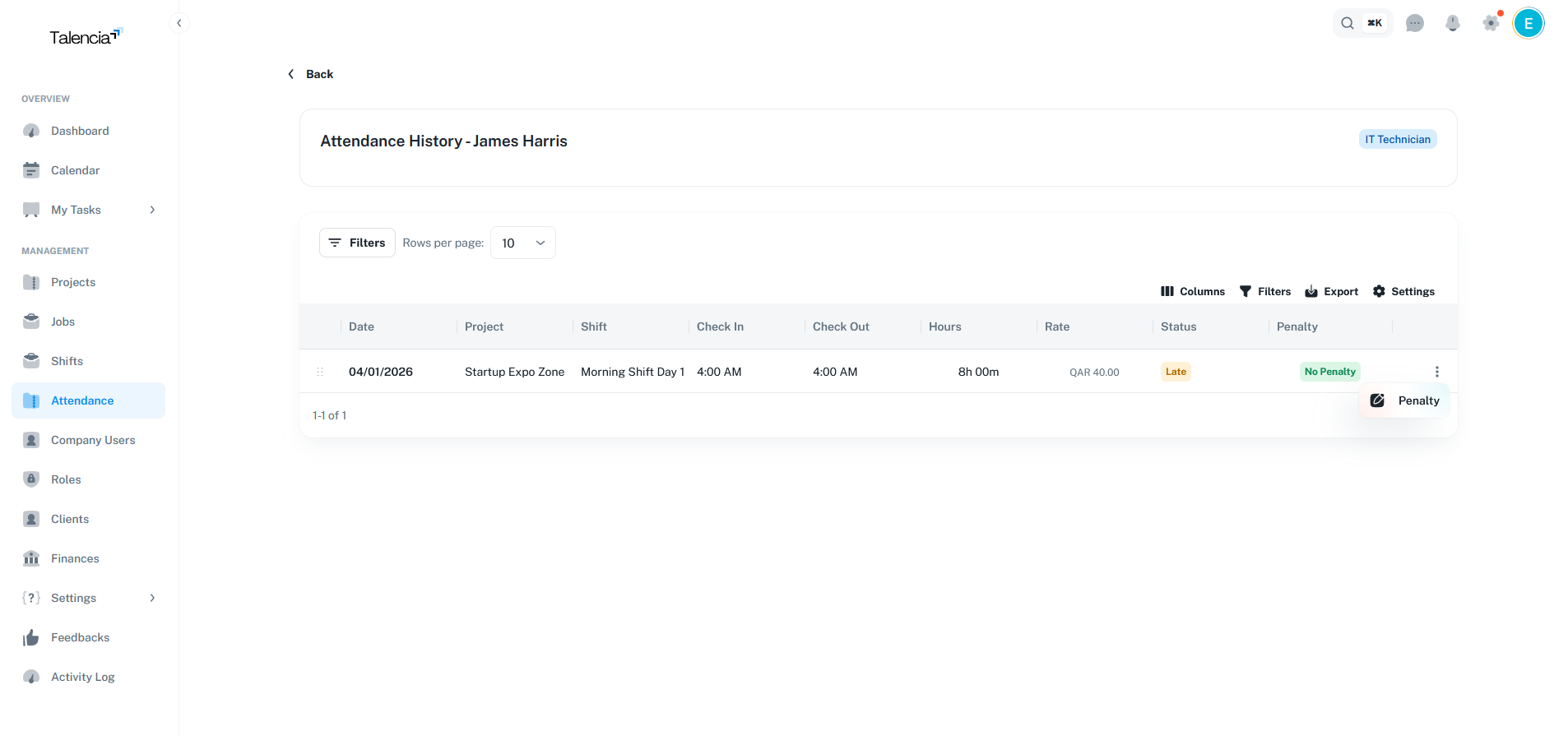
Assign Penalty Screen
Interface for assigning penalties to talent for late arrivals or absences
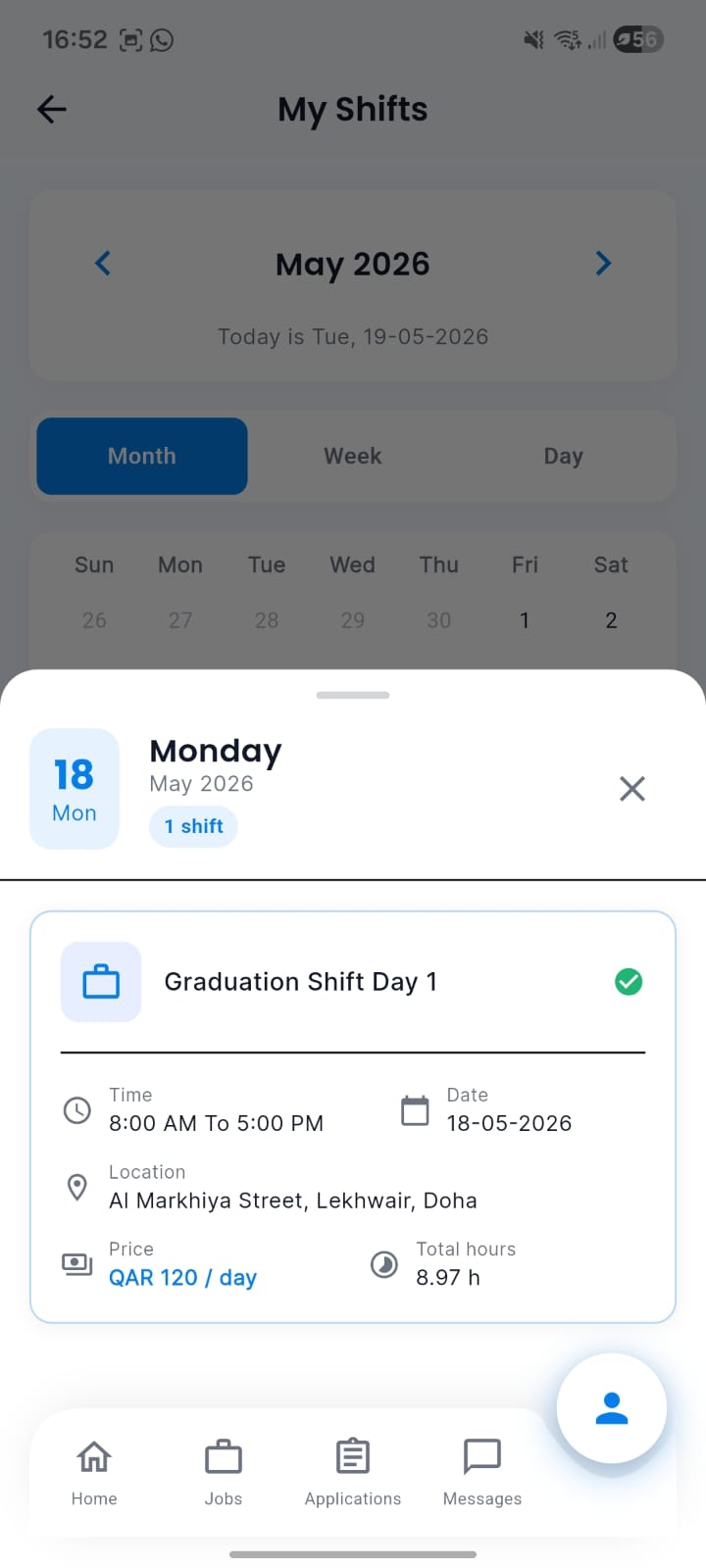
Talent Mobile Attendance List
Talent can see their list of shifts and attendances from the mobile app.
Best Practices
Attendance management guidelines.
| Practice | Recommendation |
|---|---|
| QR Code Setup | Place QR codes in easily accessible locations with good lighting |
| Late Margin Configuration | Set appropriate late margins (typically 5-15 minutes) in company profile |
| Regular Monitoring | Monitor attendance dashboard regularly for no-shows and late arrivals |
| Penalty Consistency | Apply penalties consistently and document all exceptions |
| Data Backup | Regularly export attendance data for record-keeping and analysis |
Troubleshooting
Common issues and solutions.
| Issue | Fix |
|---|---|
| QR Code scanner not working | Check camera permissions and ensure QR code is clearly visible. Try moving closer or farther from the code |
| Can't check out from shift | Make sure you have an active check-in record for today's shift |
| Attendance status showing incorrectly | Contact your administrator to check company late margin settings and shift schedules |
| Can't find attendance records | Check your date range filters and ensure you have the right permissions to view records |
| Penalty not being applied | Contact your administrator to ensure penalty types are configured and your role has required permissions |